Project overview: why I made this
- I have an interest in different methods of creating a “dumb smartphone,” that is a modern smartphone with only useful tools and apps, but no web browser or time-wasting apps.
- Built-in screentime tools on both Android and iOS are incredibly low friction and easily bypassed.
- Adding a physical location/action to removing the restrictions introduces an interesting variable.
- Including taxes and shipping, the “Brick” product that does this costs $70 for less than a dollar’s worth of plastic and magnets, and their app is closed-source. Making my own “Focus Brick” saves money and lets me use open-source apps like Foqos or Switchly.
Plus, research shows we’re all better off without the internet in our pocket: a study led by Noah Castelo published in PNAS Nexus last year finds: “correlational research suggests that smartphone use is negatively related to mental health and cognitive functioning. However, few large-scale experiments have tested for causal effects. We report such an experiment, finding that blocking mobile internet for 2 weeks reduces smartphone use and improves subjective well-being (SWB) (including life satisfaction and positive affect), mental health (more than antidepressants), and sustained attention (as much as being 10 years younger). Despite the many benefits mobile internet offers, reducing the constant connection to the digital world can have large positive effects.”1
The observed effect of blocking participants from mobile internet on their depression symptoms being larger than the meta-analytic effect of antidepressants is simply astounding; I don’t think the ramifications for modern society can be understated if this finding can be replicated.
3D printing my own NFC dumbphone toggle
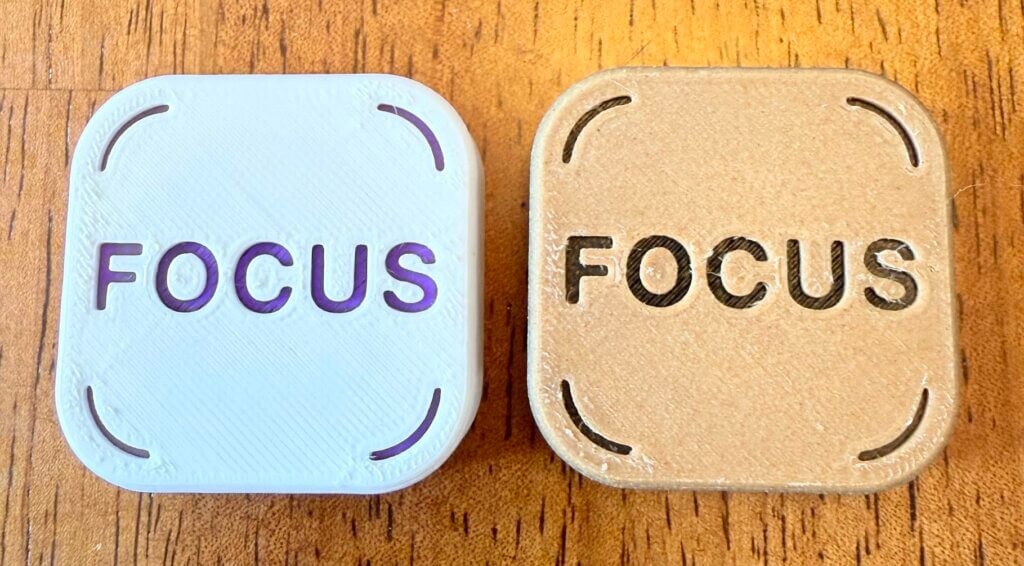
My requirements for the make were that it was magnetic (so I can stick it to the fridge at home, and my locker at work), had an internal NFC tag, and was at least a bit visually interesting or hinted at the purpose. Surprisingly there were very few magnetic NFC tag models on Printables that were not Wi-Fi tags.
Printables user @mediumchongus made a plain magnetic NFC tag styled after the Brick product. I remixed the model to deboss the text “FOCUS” on it, planning to swap the filament colors right before the text was outlined to add a bit of flair. The only real challenge was getting the slicer to detail the outer bounds of the text nicely; the default settings left gaps between the letters. I had to make several prototypes of the text layer before I was happy with it. All of the slicer tweaks I arrived at to get it looking decent are detailed on the model page.
If you want to download the model, you can get it here on Printables along with links to the magnets and NFC tags I used. The total materials cost was about $17 given that the NFC tags and magnets need to be bought in larger quantities than one may ever use, but the per unit cost including filament is around 50 cents.
Alternatives if you don’t have a 3D printer
The links in this section are Amazon affiliate links, if you were going to buy the product anyway, you can help support my projects and my site hosting costs at no extra cost to yourself by buying through these.
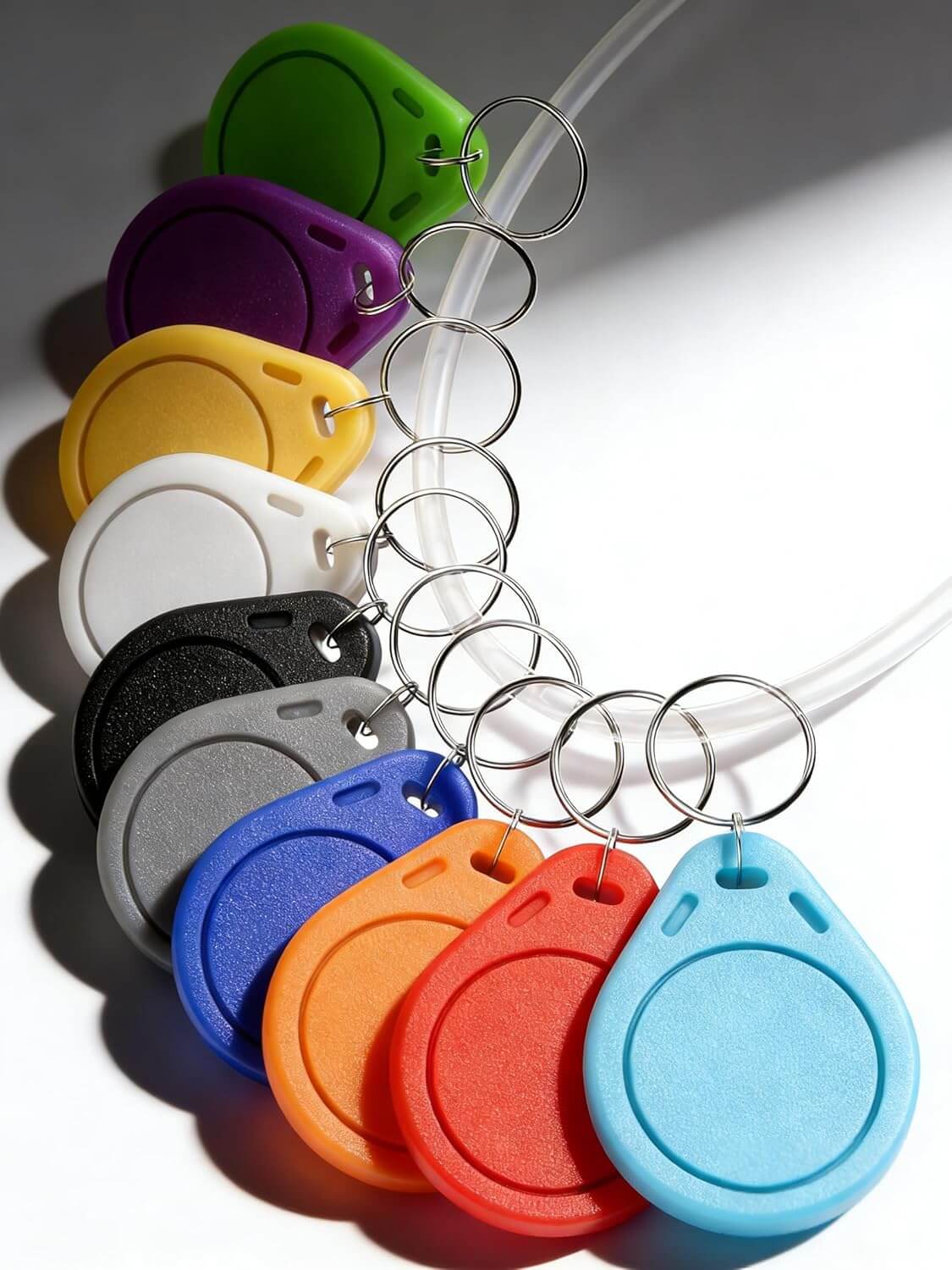
These NFC keychains are an interesting option for a pre-assembled programmable NTAG215 NFC chip embedded in a plastic shell. You could remove the keychain and stick an adhesive neodymium magnet to it and replicate the functionality of my NFC focus brick.
It doesn’t look like anywhere is selling a pre-assembled magnetic NFC tag (maybe a potential product market?) but you could easily just buy the same pack of 50 NFC stickers I used and stick them to the back of any existing magnet, a fancy piece of cardstock with a printed design on it, or anything not so thick it would block the signal.
For a nearly zero cost option, you can also print out a QR code on paper and use that to trigger the toggle!
Setting up the Foqos blocklist
Foqos is pretty easy to work with. For Blocking Strategy, I selected NFC tag, and I named my profile “Dumbphone”.
My selected apps to restrict list is pretty short, because I don’t have a ton of stuff on my phone. I restricted:
- Safari and Brave Browser, to lock out the web browsers on my phone
- App Store, so I cannot install new apps to bypass the restrictions
- Shortcuts, so I can’t cheese the automation and trigger it with a tap
Note that if you’re adding Shortcuts to your blocklist before setting up the automation and don’t get the automation 100% correct, you could lock yourself out of being able to edit it in Shortcuts, in this case you can just scan the toggle within the Foqos app to disable the restrictions and regain access to Shortcuts to fix it.
I didn’t bother setting up any website blocks, since I blocked the browser entirely. Under Physical Unlocks, I scanned my NFC tag (you can add multiple tags here if you plan to use more than one). I also toggled on “Prevent App Deletion” which prevents the user from deleting Foqos to bypass the restrictions.
The Live Activity setting seems fairly inconsistent. Sometimes it appears on my lockscreen and in my island bar (whatever the black cutout around the front-facing camera is called), and other times it doesn’t appear even when Foqos is active.
There’s not much else to see in Foqos, aside from your stats:
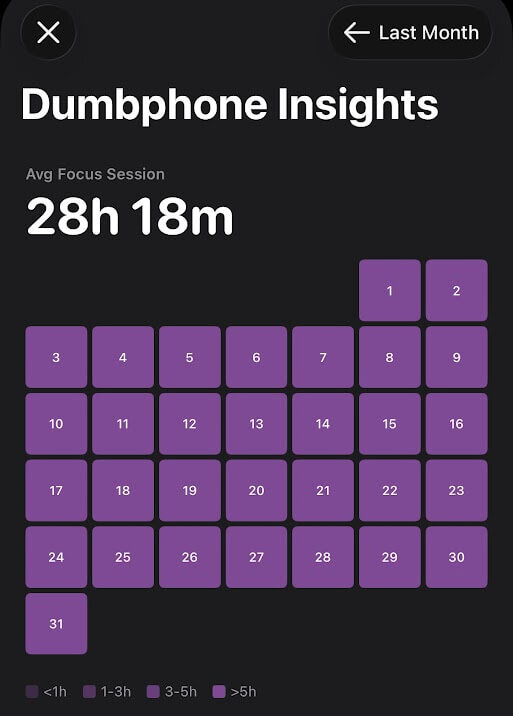
The monthly heatmap view is almost hilariously non-granular. You get the deepest color for more than 5 hours of your Foqos profile being active, so it’s possible someone could have 12 hours of phone screen time, toggle Foqos before going to bed, and their chart would look just like mine. The weekly view with total hours as a bar chart is a better presentation, but I wish it scrolled back in time more fluidly. The average focus session stat is kind of interesting to get a sense of how often you’re toggling the focus mode on or off. But there’s probably not much need to open Foqos again once you get it set up how you’d like.
Throw the developer a donation if you like it, because it’s a cool FOSS app!
Setting up the iOS Shortcuts automation
I set up an automation so I can just scan the NFC tag without opening Foqos and clicking to start/stop the profile. If you just want to download a working shortcut, here’s an iCloud link to the automation flow I made. If your Foqos profile is named exactly “Dumbphone” this should work with no tweaks, otherwise change the profile variable. If you want to make it yourself, here’s the logic flow, starting with adding the “Check if Foqos Session is Active” function then adding the If function:
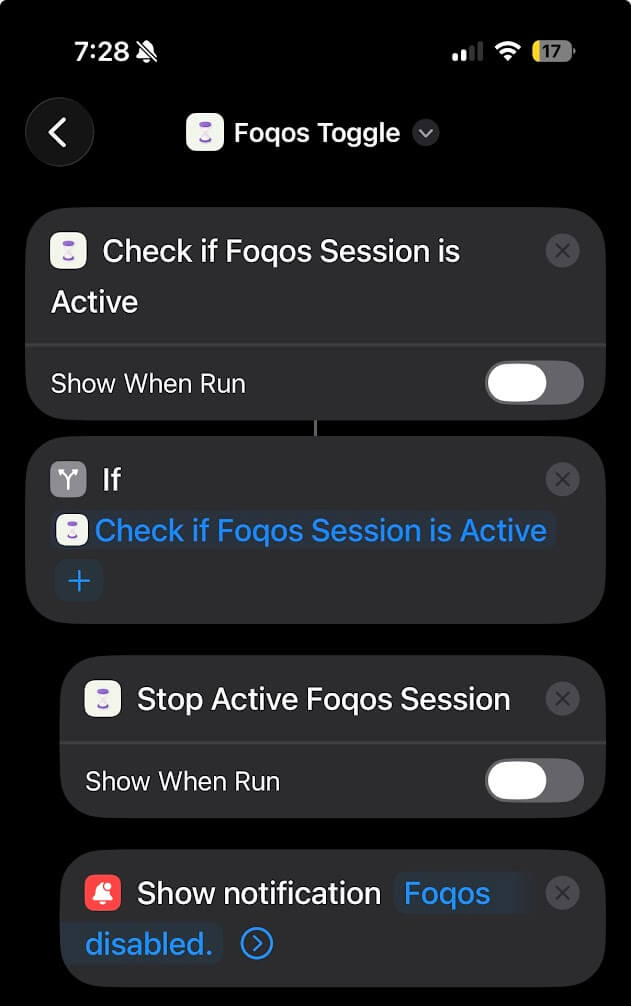
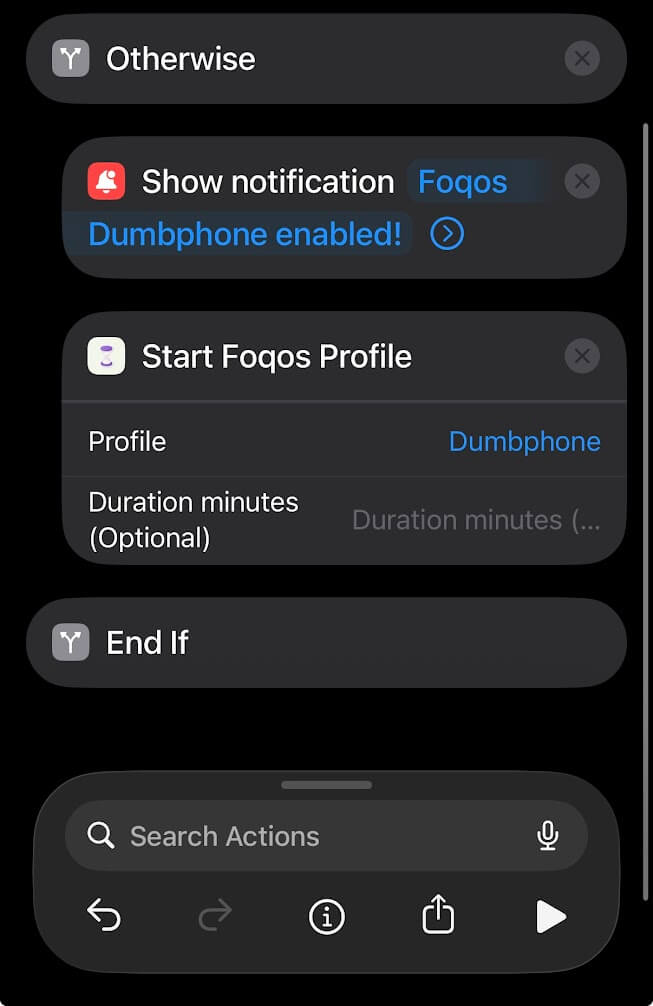
Note that the order here matters if you are restricting access to Shortcuts itself from Foqos. If the profile is active before the “Show notification” block, the notification will be suppressed by iOS and it might not be obvious you successfully scanned the tag.
That’s it. Head over to the Automation tab in Shortcuts, add a new automation to run when you scan an NFC tag, click “Run Immediately” then scan the specific tag you want to trigger it. You can make multiple automations from the same shortcut, for example I have two to trigger the same shortcut, I named them Foqos Toggle Home and Foqos Toggle Work to identify my different NFC tags.
A tighter lockdown
The benefit of restricting access to Shortcuts is that you can’t just open the app and manually trigger the automation. It forces you to use the physical NFC tag to toggle the focus mode on your phone.
A small side benefit of setting it up like that is that you can actually start the app restrictions from Shortcuts, so if you’re not near your NFC tag you can make the decision to lock down your phone, and you’re committed to that until you scan the NFC tag to unblock it.
One final thing I did was lock out access to the Settings app in iOS. Many iOS system apps can’t be restricted natively in Foqos, however the Foqos dev, Ali Waseem, has another Shortcuts automation you can download here plus a setup guide for blocking apps like Settings. If you’re the type that will poke around with blockers until you figure out how to defeat them, locking yourself out of the Settings app might be a good idea.
With Shortcuts and Settings blocked, and restricting app deletions through Foqos, I couldn’t find any way to bypass the Foqos restrictions. I’m locked in to using the NFC tag to toggle my iPhone out of my dumbphone profile.
A dumb smartphone is the best of both worlds
I really liked the idea of something like the Light Phone — I’m a sucker for E-Ink displays — and it’s marketed as a phone that “will never have social media, clickbait news, email, an internet browser, or any other anxiety-inducing infinite feed.” In addition to calling and texting there’s some basic features like an alarm, calculator, calendar, GPS navigation, and a podcast/music player. But the Light Phone’s podcast app looked clunky compared to my beloved FOSS AntennaPod on Android or the Apple Podcasts app, and it doesn’t support Spotify (or any other music streaming service). Additionally, the phone battery is only billed as lasting between 45–90 minutes when on phone calls which could be inconvenient, and seems like a strange feature to nerf. Light designed their phone “to be used as little as possible,” so perhaps this was intentional, but I’d rather have a phone that functions well in the areas it’s supposed to be a tool.
I had the same complaints with missing music streaming on other dumbphones, and the few options that came with Spotify integration like the Qin F21 Pro were ruled out due to being Xiaomi devices that aggressively phone home encrypted packets to Chinese servers.
Apps that I’ve intentionally chosen to install as a tool are just too convenient. Having Obsidian on my phone to be able to write or jot down notes, having access to my task lists, workout apps, and maps, those are all things that actively make my life easier and more productive.
I really like the physical location gating behind the NFC dumbphone toggle. There’s no opening the web browser on a whim to “look up just one thing”. I have to get up and walk to the fridge where my magnetic NFC focus brick lives, so I end up toggling my phone out of dumbphone mode far less often than I figured. I set up Foqos in April, and during May I ended up toggling the dumbphone restriction off less than once per day on average.
Previous efforts towards a browser-lite or browser-free “dumb smartphone”
I shared a bit regarding my approach towards smartphones and mastering screen time in Chapter 19 of You Should Quit Reddit, which was influenced by the realization several years ago that my smartphone was leading the pack among my devices in terms of the total percentage of time spent on it that was wasteful. I therefore haven’t had social media apps on my phone in quite some time, and I reported on how I set a fifteen-minute daily timer on my phone’s web browser to discourage scrolling the web for entertainment.
Some days I used my whole fifteen-minute allotment, though most days I did not, and probably a couple times per month I disabled the limit in order to finish a task then got distracted doing something else for an additional half hour or so before reinstating the screen time rules. Digital Wellbeing is Android’s built-in app for screen time monitoring, and Screen Time is iOS’s version, but neither are going to strongarm you into spending less time on your phone. On Android, the pop-up alerting you that you’ve run out your daily timer for an app includes a link to head directly to the Digital Wellbeing settings page where one can decrease or remove the limit! It’s incredibly low friction.
Over a year ago, when I still had an Android phone, I completely disabled the built-in Chrome browser. I told a few people what I had done; each and every one was perplexed. I was quizzed about why I would do such a thing, demonstrating how having access to the World Wide Web in your pocket at all times has become a tacitly accepted part of life — which is interesting given that a sizable majority of humans alive today should still remember a time when this was not the case.
I followed the same path when I switched to an iPhone last fall, disabling Safari through the system settings. But on both phone platforms it’s super easy to reverse. A few clicks, less than 15 seconds, and you have a browser again. This makes it easy to quickly toggle the browser back on to do things like scan the QR code to see the menu at a restaurant; on the other hand this ease of reversing it makes the decision to disable it in the first place mostly inconsequential. Having a “dumbphone” should cause some discomfort and inconvenience, should require planning and doing things a different way than we’ve become accustomed to. If that friction doesn’t exist, then whatever method is being used probably isn’t nearly as effective as it should be.
What if you just need a web browser on the go?
This is probably the most common challenge I receive to my browser-free smartphone. What if there’s just something so important, so critical, that I need a web browser to do it and I simply can’t because I’m away from home or work where my NFC toggles live and I’m locked into an iPhone in dumbphone mode?
Honestly, it hasn’t happened much. There was one time we were on vacation, before I was using the NFC tag, and I had to re-enable the browser on my Android phone to fill out an online form for some activity we had scheduled. This is the only thing I can think of in the past two years where if I was completely locked out of using a web browser like I am now, I probably would have had to borrow my wife’s phone to do something I needed to do but physically couldn’t. So next time maybe I’ll plan ahead and just bring the NFC toggle in my suitcase, or maybe I won’t, and just try to adapt to whatever challenges a digital minimalist with a dumbphone will face in the modern world.
If you’re like me and can never remember whether there’s three or four teaspoons in a tablespoon (it’s three, but I just had to look it up), you can use a voice assistant like Siri. You can install a search engine app like Google on your phone (I specifically use Google as an example because the app has no internal browser, you can search for simple stuff like facts and phone numbers but any links you click will redirect to your phone browser, e.g. they’ll be blocked via Foqos). If you’re not entirely anti-AI, you can install Gemini on your phone and ask it to fetch the phone number for your town’s water department.
What if you go to a restaurant and they only have QR code menus, and you’re alone and can’t shoulder surf someone else’s phone to view the menu? Well we’re then in an interesting position. You can ask the server to recommend a handful of the best items and pick from that, or you can go somewhere else.
In my experience over the past couple of months I’ve been using this NFC focus brick, the benefits of a “dumb smartphone” on reducing technological distractions far outweigh the costs, which mostly appear to be hypothetical.
- Castelo N, Kushlev K, Ward AF, Esterman M, Reiner PB. Blocking mobile internet on smartphones improves sustained attention, mental health, and subjective well-being. PNAS Nexus. 2025 Feb 18;4(2):pgaf017. doi: 10.1093/pnasnexus/pgaf017. PMID: 39967678; PMCID: PMC11834938. ↩︎