I recently set up a redundant pi-hole in Docker on my home server to alleviate the single point of failure from my original pi-hole which runs on bare metal on a Raspberry Pi 4B. I’ve been using a single pi-hole for about six years to block advertisements, tracking links, and time-wasting websites across my home network. During that time my pi-hole has gone down 3 or 4 times. A couple were due to corrupted microSD cards (all that logging is pretty rough), and most recently the major version update to pi-hole v6 bricked my install beyond repair, requiring a fresh reimage.
My router doesn’t support scripting, so if the pi-hole dies the home network loses all connectivity until I can get into the router and manually switch back to public DNS. Not a great event if my wife is working from home and I’m away. Hence the redundant pi-hole, and with the router configured to use both as DNS servers, I should have plenty of notice to repair one if it goes down while the network continues humming along on the surviving pi-hole.
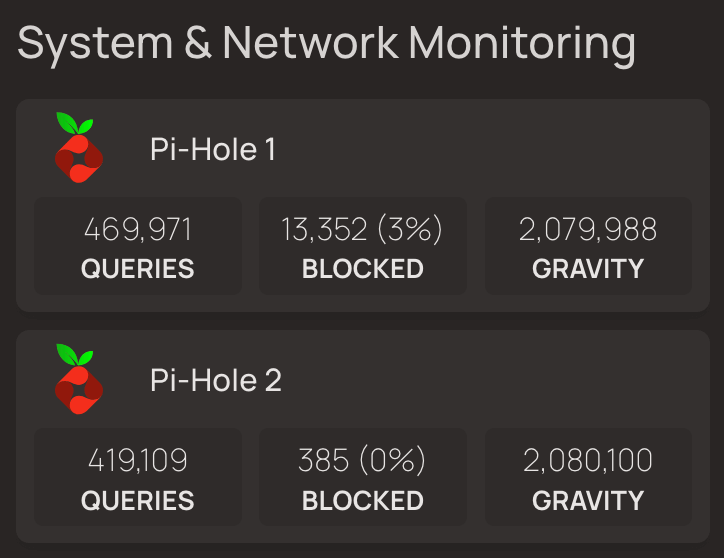
I monitor both pi-holes from my Homepage dashboard, and since setting up Pi-Hole2 I’ve noticed an abnormally large number of queries (per 24 hours) that never settled out after several days:
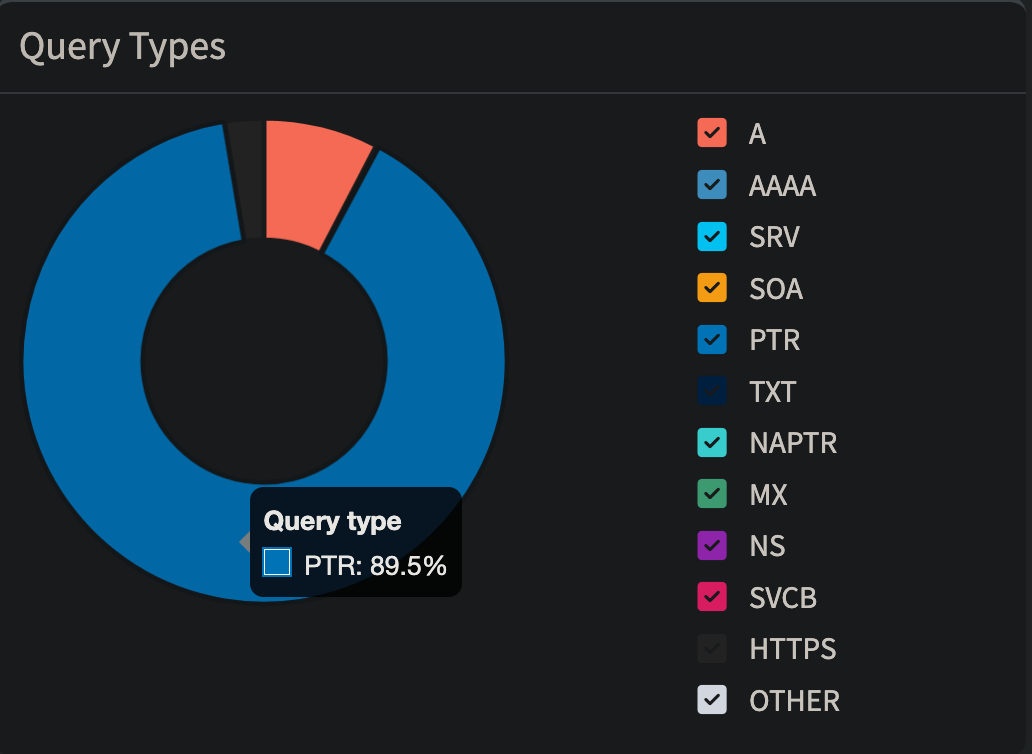
Both pi-hole dashboards show an outsized number of pointer (PTR) requests, which are used for reverse DNS lookups:
A quick check of my top permitted domains shows some very blatant suspects:
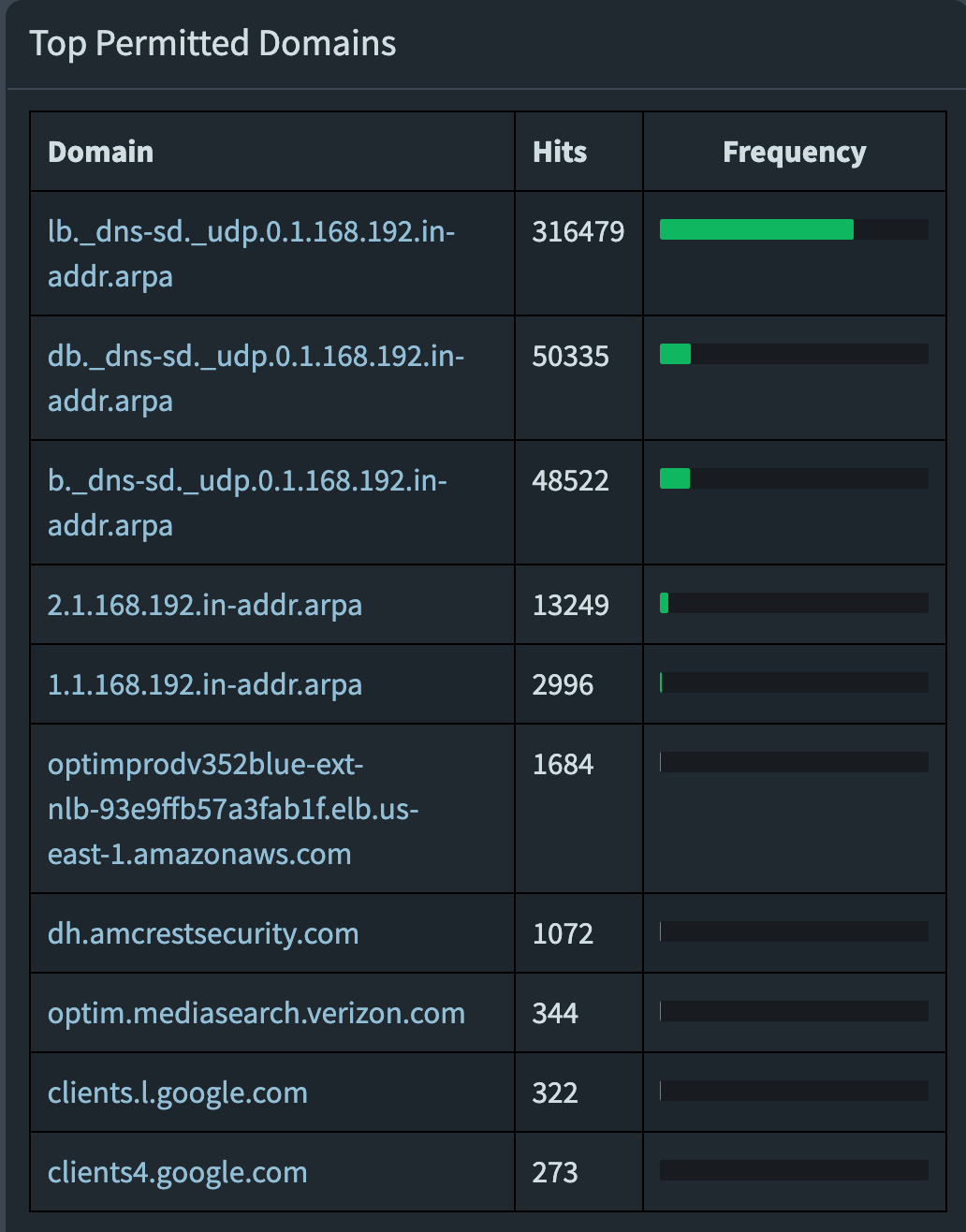
Over 400,000 requests per day on each pi-hole to lb._dns-sd._udp.0.1.168.192.in-addr.arpa, db._dns-sd._udp.0.1.168.192.in-addr.arpa, and b._dns-sd._udp.0.1.168.192.in-addr.arpa.
A quick internet search reveals these to be Multicast DNS (mDNS) requests for DNS Service Discovery (DNS-SD), frequently associated with Apple’s Bonjour protocol, which allows Apple devices to automatically find and advertise services on a local network independent of a central DNS server. Bad Apple! If I want to connect two devices on my network, I’ll assign them static configurations and do it myself.
Further investigation of my pi-hole logs revealed these PTR requests to be coming in batches of 1000, which conveniently enough is the default rate limit that pi-hole applies to devices making more than a threshold amount of queries per minute. Without that rate limit, Apple Bonjour would have likely brought my home network to its knees.
Developers on the official pi-hole forums proposed a number of solutions, none of which were satisfactory to me:
- Set the router’s WAN DNS to a public DNS resolver. I can’t do this as my router doesn’t allow separate LAN and WAN DNS resolvers; even if I could I truly don’t think this would solve the issue as mDNS is a local network protocol and is not forwarded to the internet. Plus this would just lead to DNS leakage defeating the purpose of pi-hole.
- Use pi-hole as the DHCP server. I’m already doing this, it works fine to make Apple Bonjour behave but only if the user has one pi-hole on their network. I have two pi-holes, and I split my subnet so they can both act as DHCP servers on non-overlapping ranges for maximum redundancy.
- Disable conditional forwarding. I don’t want to do this if I don’t have to. I like the client/device names showing in the pi-hole logs, and without conditional forwarding pihole2 has no knowledge of DHCP leases from pihole1, so the logs just fill with IP addresses. The only workaround would be to statically configure every client in my network and share that across both pi-holes, but I’d rather not.
Why pi-hole explodes with Apple Bonjour when conditional forwarding is enabled
As far as I understand it, here’s the network flow:
- An Apple device sends a multicast DNS packet to all devices on the local network. This is structured as a reverse query (in this case, 0.1.168.192, a rarp for my private IP subnet 192.168.1.0/24) to the whole subnet. mDNS operates on the local network using multicast out of UDP port 5353, which pi-hole is blind to as it’s listening for unicast DNS on port 53.
- All devices on the network listening on port 5353 receive the mDNS broadcast packets, learning things from the sender like hostname, type, and A/AAAA records to map hostnames to IPs. Any device supporting Service Discovery responds in kind with its own info. Again, we can’t see any of this in pi-hole.
- There’s another protocol of Apple Bonjour running on UDP port 53. This is unicast traffic for DNS Service Discovery, and it’s Bonjour trying to query if any DNS server handles service discovery for the network. But it’s using the same naming conventions mDNS uses. This request being unicast goes out on port 53 to pi-hole, our DNS server, and it’s the queries I see taking over my pi-hole logs.
- Pi-hole should reply “no such domain”, indicating no special DNS-SD records are published, and the Apple Bonjour client should then fall back to the answers it collected from the port 5353 multicast. Pi-hole does not do this which is where the trouble starts when the user has conditional forwarding enabled.
- Pi-hole has no capability to resolve the unicast DNS-SD request; with conditional forwarding enabled pi-hole1 then forwards all the
lb._dns-sd._udp.,db._dns-sd._udp., andb._dns-sd._udp.queries to pi-hole2. Pi-hole2 cannot resolve the request and sends it back to pi-hole1. Repeat back and forth on port 53 until the rate limit is hit. Over and over, 1000 requests every time an Apple device tries to discover if there’s an authoritative DNS-SD server on the network.
What didn’t work
I tried modifying misc.dnsmasq_lines to inject a custom configuration into dnsmasq on the pi-holes. First I tried pointing these addresses to 0.0.0.0 and then restarting the DNS resolver service:
address=/lb._dns-sd._udp.0.1.168.192.in-addr.arpa/0.0.0.0
address=/db._dns-sd._udp.0.1.168.192.in-addr.arpa/0.0.0.0
address=/b._dns-sd._udp.0.1.168.192.in-addr.arpa/0.0.0.0
When that didn’t work, I tried pointing them to NXDOMAIN:
address=/lb._dns-sd._udp.0.1.168.192.in-addr.arpa/#
address=/db._dns-sd._udp.0.1.168.192.in-addr.arpa/#
address=/b._dns-sd._udp.0.1.168.192.in-addr.arpa/#
Neither of those seemed to do anything at all, because I was using the wrong tool for the job. address= is for A records (forward DNS); if a client asks for a name, it provides the IP.
Ending the Apple Bonjour DNS-SD loop
In this case these are reverse DNS requests, which as I learned cannot be resolved from the inverse logic of a forward lookup entry. The proper tool for the job is ptr-record=, which provides a hostname in response to an IP or string:
# Syntax: ptr-record=<reverse lookup>,<target>
ptr-record=lb._dns-sd._udp.0.1.168.192.in-addr.arpa,pihole2.local
ptr-record=db._dns-sd._udp.0.93.86.10.in-addr.arpa,pihole2.local
ptr-record=b._dns-sd._udp.0.93.86.10.in-addr.arpa,pihole2.local
I pasted that into misc.dnsmasq_lines on both piholes and the loop was solved. Interestingly, to stop the loop Apple Bonjour does not have to receive a correct answer, (pihole2.local is not an authoritative DNS-SD server, it’s just the hostname of one of my pi-holes). There just has to be an answer so the pi-holes aren’t bouncing the request they cannot resolve out of the box back and forth.
What also worked and was far more simple to figure out was making a simple regex blacklist in pi-hole to nicely wrap up all these domains in one entry and blacklist them. I came up with the following regex deny filter to blacklist all three flavors of offending PTR requests on both pi-holes:
^[a-z]?b\._dns-sd\._udp\.Verifying it works next time we see Apple Bonjour trying to look for a DNS-SD server:
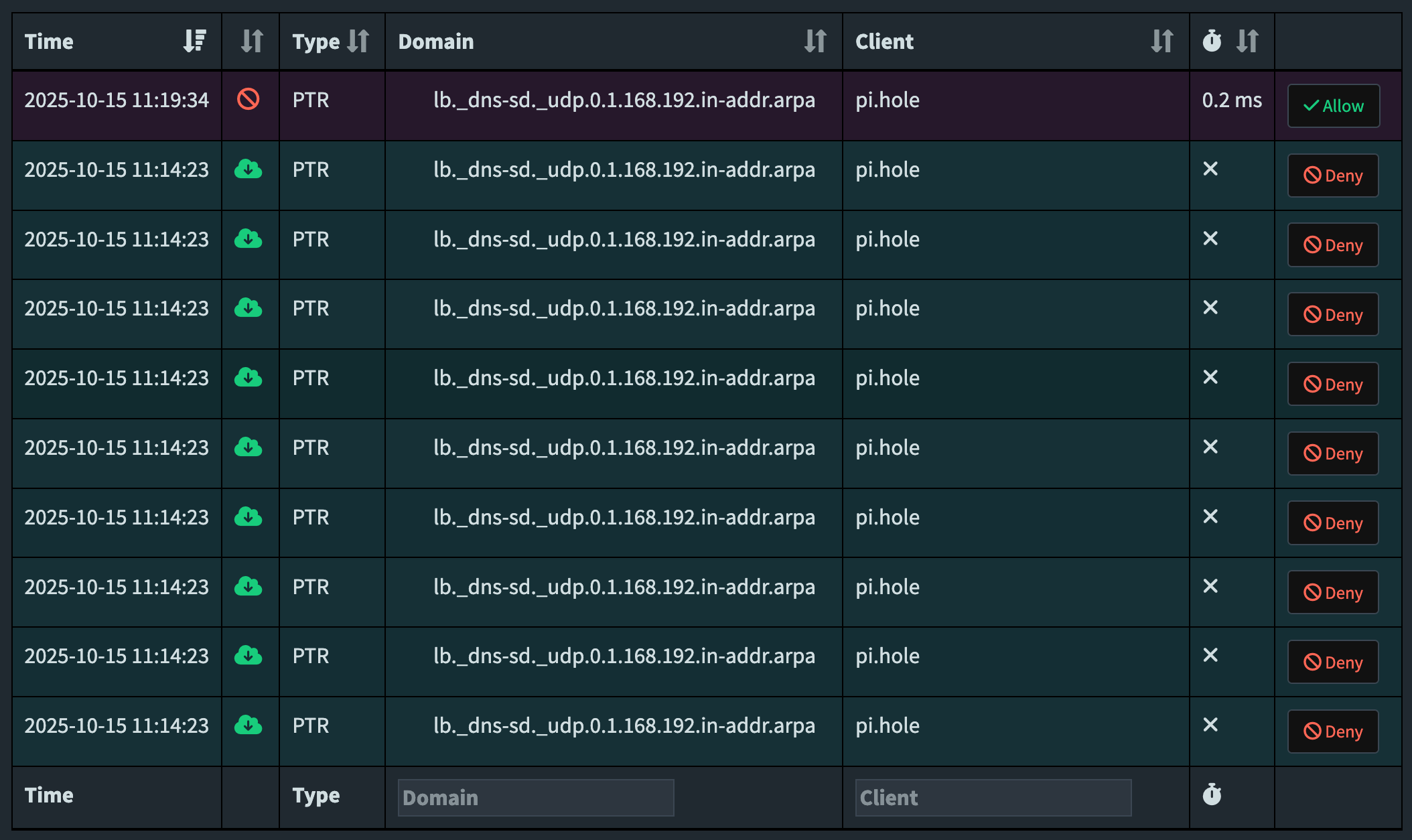
Nice. One blacklisted query and it’s done, I don’t get 1000 echoed queries back and forth between the two pi-holes as I did five minutes previously. Note that if you ever “disable blocking” in pi-hole the regex blacklist will also be disabled, so the pointer records in misc.dnsmaq_lines are the more elegant, proper solution.
Ending the Apple Bonjour local loop
I also discovered a bunch of requests to “local” stuck in a DNS loop until hitting the rate limit, though a small fraction compared to the above offenders. I go back in my logs to check the origin of the request and big surprise, it’s an Apple device again!
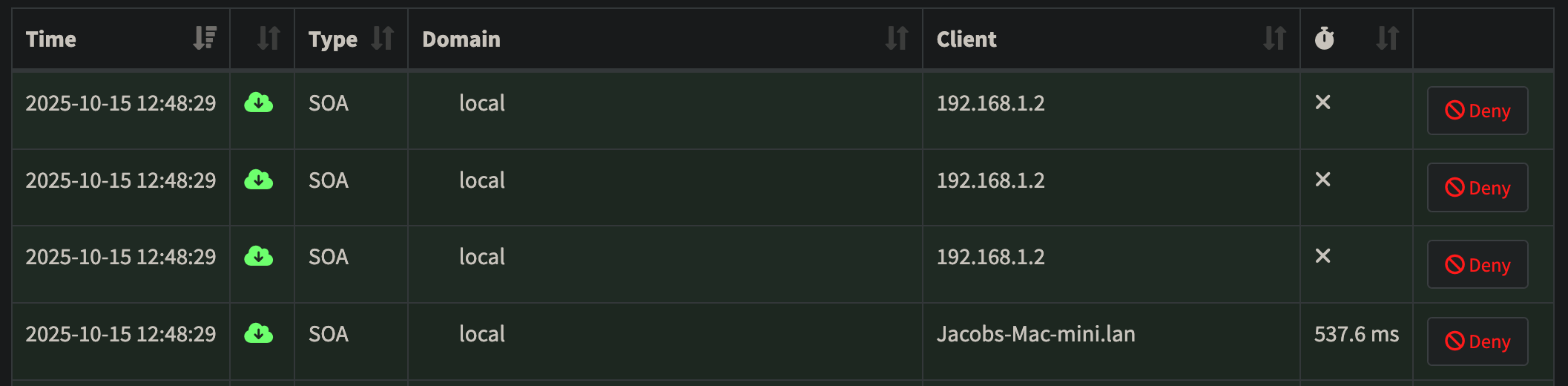
These .local queries are also a part of the multicast DNS network discovery process of Apple Bonjour. Easily eliminated in pi-hole by going to Settings –> DNS and checking the box to “Never forward non-FQDN A and AAAA queries”. From the description of the toggle we learn that this setting “Tells Pi-hole to never forward A or AAAA queries for plain names, without dots or domain parts, to upstream nameservers. If the name is not known from /etc/hosts or DHCP then a ‘not found’ answer is returned.” Sure enough this setting works as advertised and the local queries are whittled down to a handful per hour after a restart of pi-hole’s DNS resolver.
Why dead-ending or blacklisting these queries is fine, and doesn’t even break Apple Bonjour’s local network discovery!
As I explained earlier, these DNS Service Discovery requests on port 53 aren’t providing any essential information to Apple Bonjour. All they’re looking for is an authoritative server on the network that is already handling service discovery. We don’t have one of those (at least I don’t at home), and since pi-hole lacks the ability to properly resolve these DNS-SD requests, sinkholing them is the closest we can get to responding “no such domain”. And we get to keep conditional forwarding enabled!
Apple Bonjour already got all of the information it needs to discover other devices from the multicast DNS it also sent out on port 5353 that pi-hole can’t see. We can easily verify that with an app like Discovery – DNS-SD Browser by Lily Ballard on the App Store.
Here’s all the local devices Apple Bonjour discovered over Wi-Fi on my iPhone, including my Vizio TV:
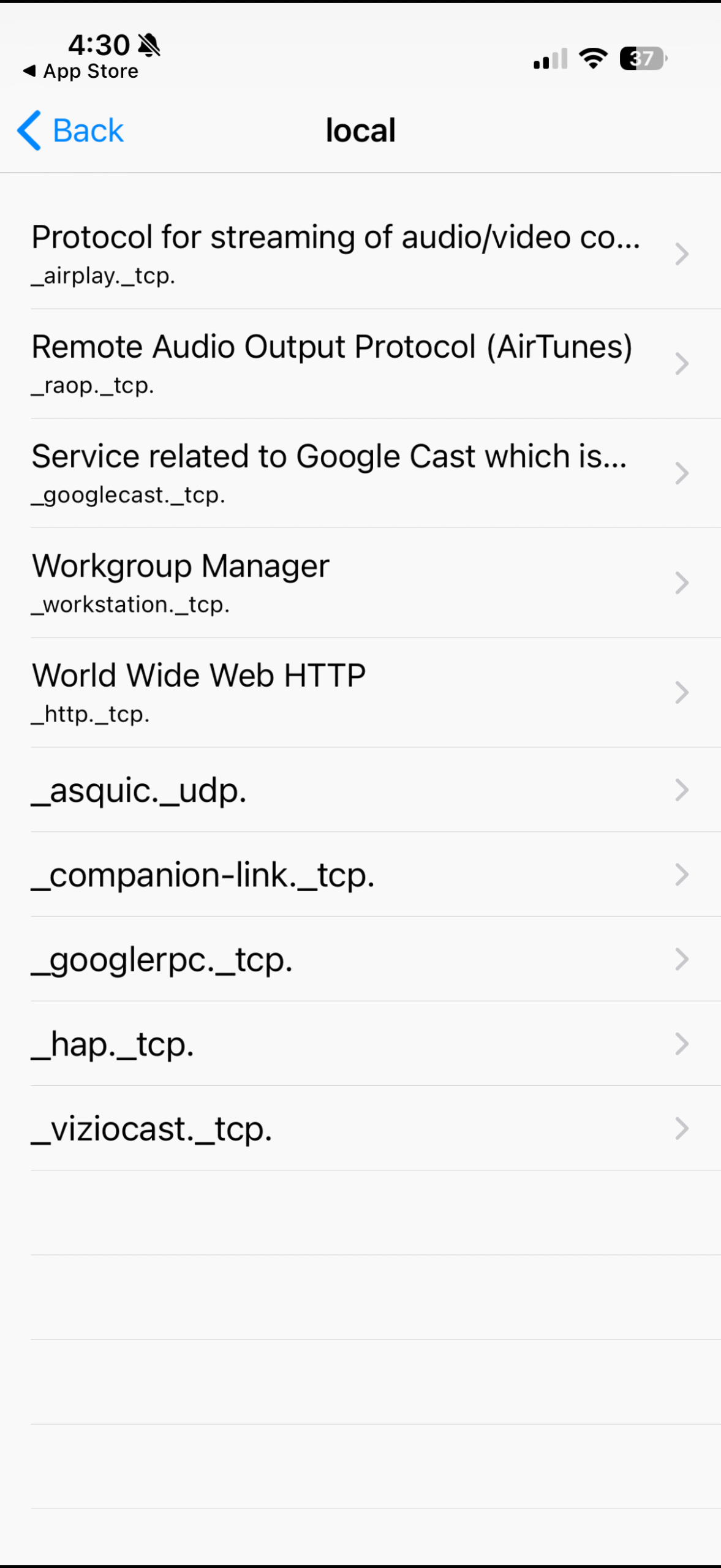
And from my Mac Mini over ethernet I can run in the terminal dns-sd -B _services._dns-sd._udp. to see the same information, verifying I can see the same devices, though a couple are duplicated in the terminal output compared to the app.
Before and after, my pi-hole dashboard is useful again
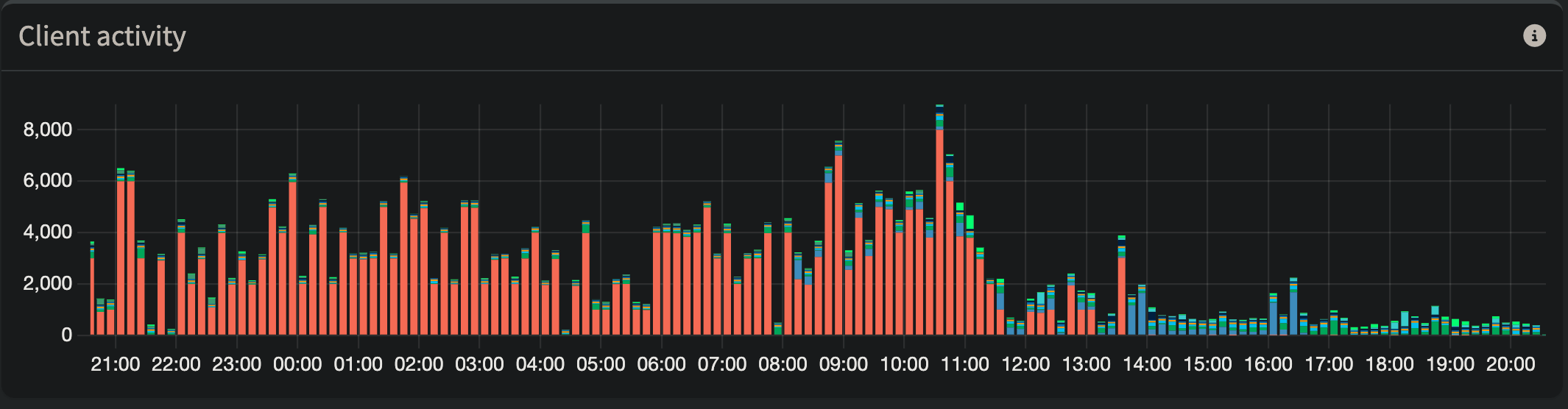
Silencing the DNS loops caused by Apple Bonjour and pi-hole’s conditional forwarding yielded some immediate and obvious results on my primary pi-hole:
On the secondary pi-hole, an even more drastic reduction:
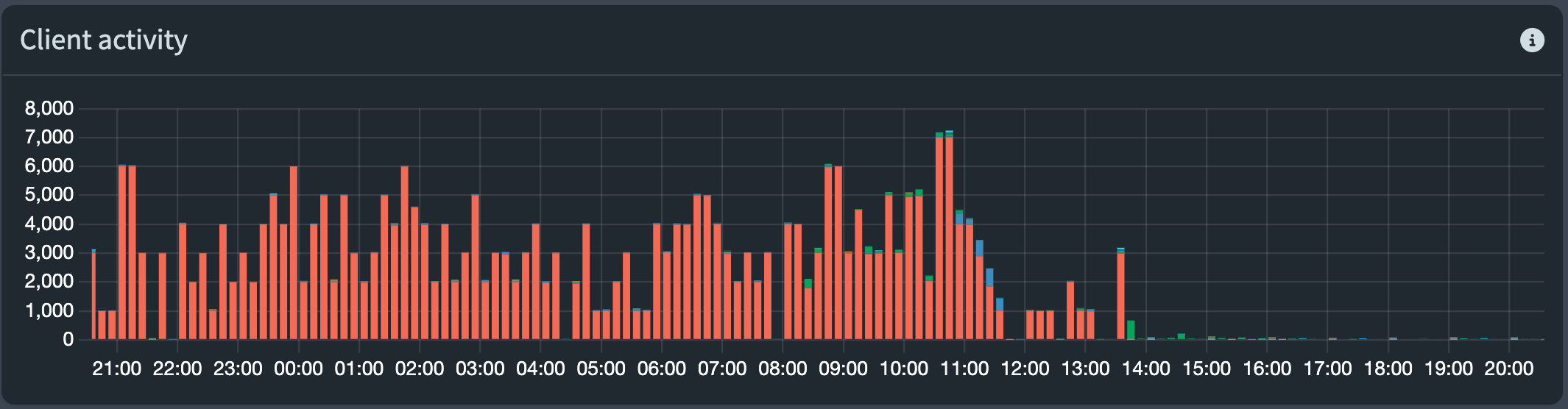
Pi-hole2 is used far less frequently, I assume because most devices on my network had existing DHCP leases on pi-hole1 and prefer to use the first listed DNS in my router.
The red on both pi-holes are queries from its partner pi-hole. Hundreds of thousands of looped queries per day. Tomorrow when this data falls off and the scales readjust, I’ll actually be able to use these charts to once again get a visual representation of how chatty different devices are.
I’m happy to have resolved this and now I can leave my redundant pi-hole setup alone to hum along smoothly without DOSing my own network or polluting the logs with thousands of repeated queries.
It’s relatively niche to run multiple pi-holes, but maybe the Pihole team could implement a toggle setting to “silence Apple Bonjour conditional forwarding loops” that implements the misc.dnsmasq_lines logic on the backend? This may be difficult given ptr-record= does not support wildcards, however the user already needs to know and enter their subnet when they enable conditional forwarding, so there’s a possible link there.
I had this same issue with my one pi-hole using unbound and through my research discovered this occurs when there is more than one Apple device with the same network name. In my case, I had two Apple TV devices named Bedroom. After changing one, the DNS thrashing seems to have been alleviated without disabling conditional forwarding.
Thanks for adding your experience. I believe this post is the most complete single source of information on the internet for this “pi-hole meets Apple Bonjour” issue, so it’s nice to collect all the different solutions and things that have been tried. I’ve been meaning to set up Unbound on my home server, but have not yet gotten around to it.
I did double check for my dual pi-hole setup and all of our Apple devices have unique device names, so this cause may be unique to single pi-hole setups, or your specific pi-hole/Unbound interactions.