Or, why ad-reinsertion companies like Ad-Shield should be considered as threat actors
It’s an oft-expressed sentiment of people who use ad blockers that they have no idea how people who don’t use them even navigate the modern internet. And it’s not hyperbolic. I mean, look at this recipe blog “GimmeSomeOven”! And every recipe site using the same Raptive ad management engine (read: most of them) looks exactly like this to most web surfers:
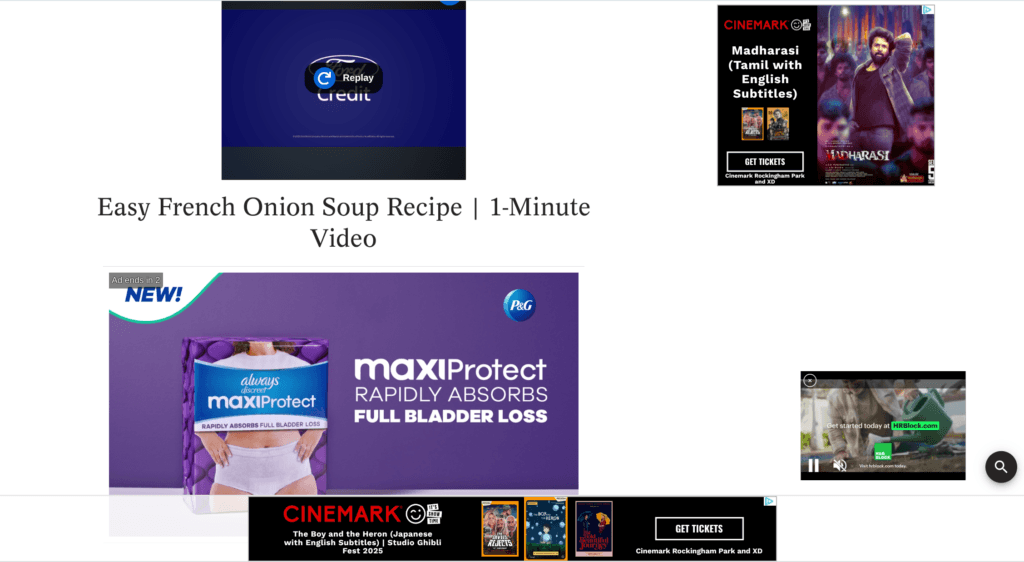
There’s no room for a moral argument against blocking ads robbing the site owner of compensation, when the vast majority of sites that show ads degrade the user experience beyond any reasonable usability.
Here’s what happens when we load the page without an ad blocker on the “GimmeSomeOven” recipe blog, and any other site running Raptive:
- User navigates to the recipe blog.
- Recipe website makes over 100 DNS requests, a few for content retrieval but most are advertisement related.
- Domains like
id.crwdcntrl.netandid5-sync.comare called first to set cookies, track user behavior across websites, and sync data for targeted advertising. - Now that they know who or what you are, real-time ad bidding takes place: domains including
prebid.sv.rkdms.com,config.aps.amazon-adsystem.com,prebid-server.rubiconproject.com, andpbs-raptive-us.ay.deliveryare contacted to auction ad space to multiple marketplace networks. - I then see a dozen requests to
googleadservices.com, indicating that for my session, someone in the Google Ads pool won the bid, which of course they did: Google has the largest pool of advertisers and the most data on users. After winning the bid, Google prepares the web environment to track if and how the user interacts with the ad. - Requests to
gstatic.comload the static ads, whileimasdk.googleapis.comloads the (ultra annoying) video ads. The video ads ping back toadtrafficquality.google.comevery 25% of progress played to verify the ad actually played.
All of that is pretty transparent; Google’s advertising domains are pretty easily identified and blocked, and with enough persistence most of the companies offering tracking services, ad bidding, and ad content delivery will be identified and blocked by those assembling ad blocker blacklists. I had to disable my blocker just to see the network requests above that happen when a user not blocking ads ventures to this recipe blog.
What happens when we’re using a DNS-level ad blocker?
- The blog pings
google-analytics.comandads.adthrive.coma couple times, seeing that they’re blocked it pivots to the ad recovery strategy. - The site pings
html-load.comto check if the advertisement “backdoor” is open. If it is, we then see a flurry of activity to domains like1.s.html-load.com,3.s.html-load.com,8.s.html-load.comconducting the pre-bid and then advertisement delivery. During delivery, the ads are wrapped in a layer of Javascript that only unpacks once it’s in the user’s session, bypassing static filters.
Super interesting. html-load.com is clearly named to make the network admin think it’s pretty innocuous. I even saw a subdomain iteration named fb.html-load.com, which from my research does not appear to be associated in any way with Meta’s ad network, but may be intentionally named to deceive network admins into thinking this is traffic related to scripts loading generic Facebook HTML structure.
The Russian nesting doll of deception
What happens if I wildcard blacklist html-load.com and reload these recipe blogs? The ads are still there! A check of my DNS logs reveals the domains have just shifted to another innocuous sounding collection of domains… 1.content-loader.com, 2.content-loader.com, etc.
I then wildcard blacklist content-loader.com and the ads still slip through! This time brought in on the coattails of subdomains of js-loader.com and css-load.com! Similar strategy to html-load.com, where the domains sound generic, harmless, and essential. Let’s block those too. How deep does this go?
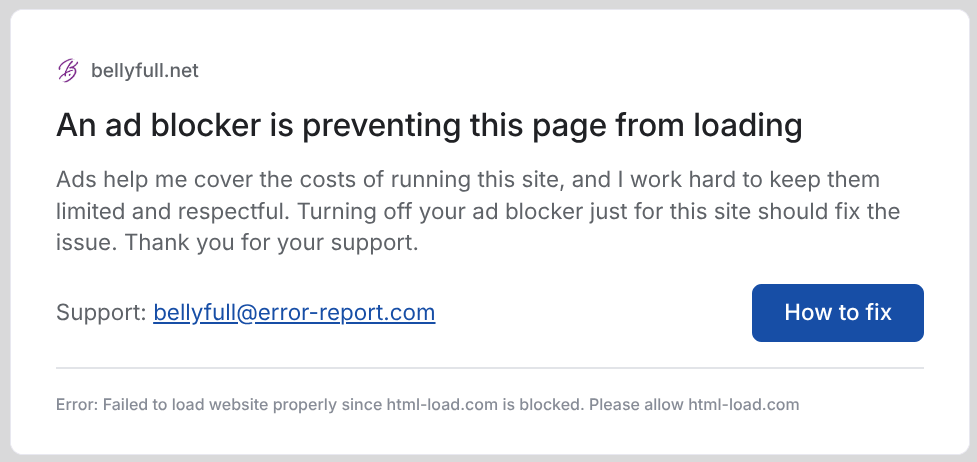
Apparently I’m close to the end of the tunnel here. Hmm, well the above popup is served by error-report.com, let’s blacklist that too!
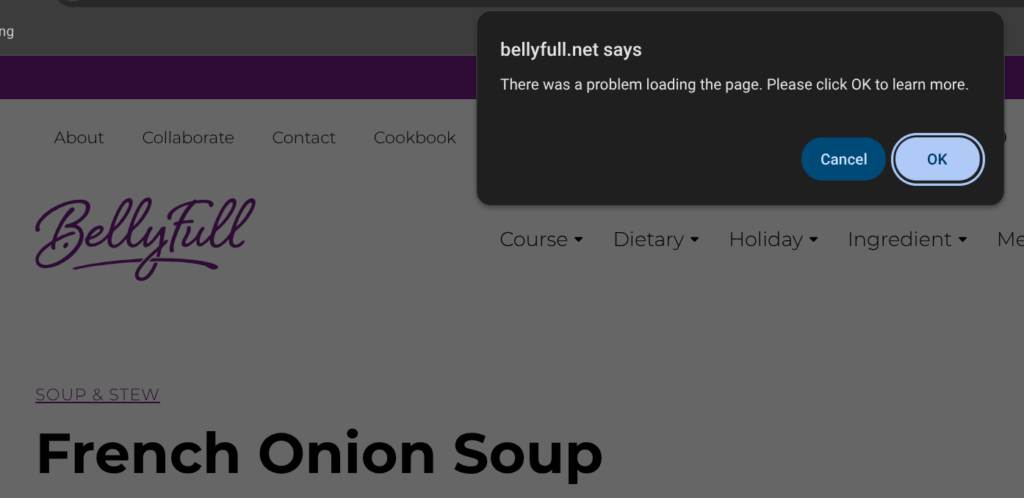
We now get this browser window popup, unfortunately it’s a bit of a hostage situation. “Cancel” just causes the window to pop up repeatedly. “Okay” takes us to an error-report.com page which doesn’t load because I just blacklisted it. I can only defeat the popup by disabling Javascript on the page. Finally, the recipe!
Undeniably linking this back to Ad-Shield, an “ad recovery” business
The WHOIS records for the domains like html-load.com are private, masked by GoDaddy.
Google’s AI Overview claims there’s nothing to see here:
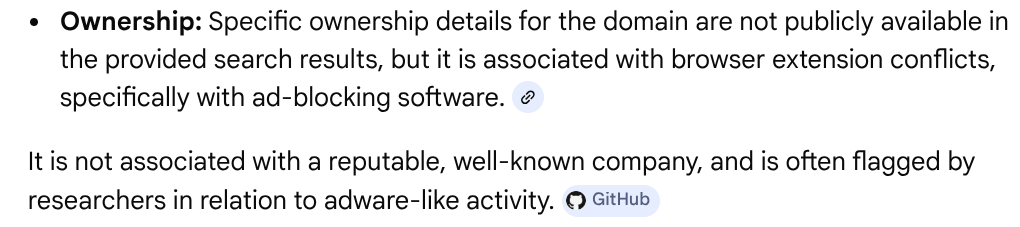
A couple GitHub threads claim these domains are owned by Ad-Shield, but let’s prove it beyond any doubt. We can query the name servers to see everything is masked behind Cloudflare DNS proxies:
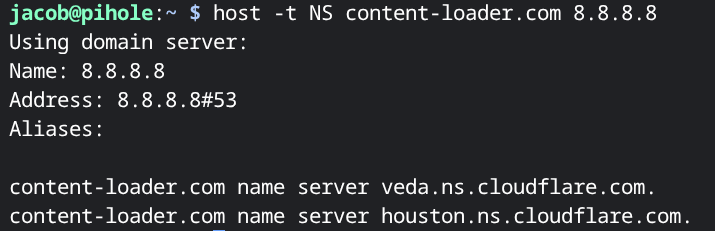
Similarly, the A and AAAA records all resolve to Cloudflare IPs. The TXT records are empty. The CNAME records for most of the subdomains coming up in my DNS logs are completely empty. They’ve done an okay job hiding themselves. However, the CNAME resolution for the fb.content-loader.com subdomain is perfectly incriminating:
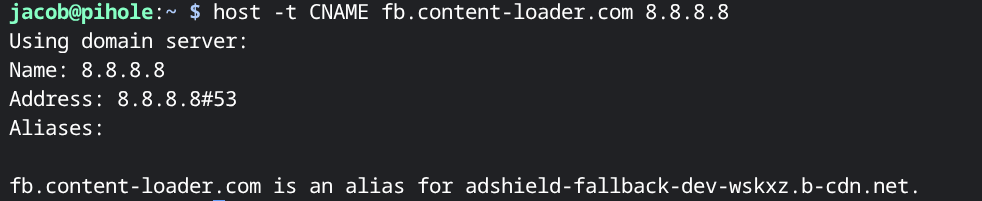
Caught them! adshield-fallback-dev-wskxz.b-cdn.net points back to the Ad-Shield mothership via one of their obfuscation domains.
What is Ad-Shield?
I’ll admit that I had never heard of this company. Ad-Shield (ad-shield.io) has the tagline “Measure & Monetize Dark Traffic.” Their home page further claims: “79% of adblocking traffic isn’t captured by existing analytics, Acceptable Ads, and adblock walls — dark traffic. Address it with an adblock recovery solution built for this new era.”
They claim they can recover 80% of the revenue lost to users using ad blocking solutions, which may not be that outlandish, since it worked on what I thought was my fairly aggressive pi-hole setup with many blocklists, 2.5 million blocked domains, and which sometimes was so block-happy that it broke websites for me — a price I’m generally willing to pay for increased privacy.
Ad-Shield has a free “Dark Traffic Report” gated behind a name and business email input field. The field rejects Gmail and other common consumer email domains, but you can put pretty much any other gibberish email and domain that doesn’t even need to exist, since the download will trigger in your browser once it’s satisfied you’re cool enough to have a totally real business email like nobody@nothing.com.
It’s a lot of marketing fluff, but here’s the interesting keynotes:
- They claim nearly a billion web users are “dark traffic,” which has grown by 49% in 3 years.
- They separate “soft adblockers” like AdBlock and AdBlock Plus because those allow “acceptable ads” and often still allow webmasters to collect analytics. Essentially everything else including uBlock, pi-hole, NextDNS, browsers like Brave and VPNs such as ProtonVPN with built-in blockers are classified as “brutal blockers.”
- They have a particular interest in bypassing ad blockers instituted by workplace IT departments and enterprise security providers, because the end users “didn’t make a conscious decision to block ads.”
Slide 15 is titled “Why organizations use brutal adblockers” with the admission that “as cybersecurity threats from digital advertising increase, organizations are responding by deploying adblocking tools to protect their networks, devices, and users.” Nowhere in the presentation does it discuss how Ad-Shield vets advertisers that they’re enabling to bypass ad blockers.
That seals it by their own admission: network admins of both home and corporate networks should consider Ad-Shield a threat actor using evasion techniques and obfuscation to open threat vectors inside their networks.
Why are recipe blogs ground zero for ad-reinsertion?
As far as I can tell, this is because Raptive (formerly AdThrive) is the undisputed king of ad delivery in this web niche. They’ve had the largest audience in the “food and family” niche for 7 years in a row[1]. Mediavine, their main competitor, still appears to be focusing on “acceptable ads” rather than ad recovery. Since all websites using Raptive now have ad recovery enabled by default, the result is that a lot of recipe blogs are using this.
I’d bet there’s also an element that most visitors to recipe websites are single visit users rather than returning readers, therefore the webmasters are less concerned with overwhelming the visitors with a deluge of ads; you’ll probably never be back, and all the other top web search results for recipes are similarly filled with ads.
Back to my french onion soup recipe: I opened the top 10 webpage results Google returned. 7 of them were using Raptive; a script tried to block me from viewing the recipe at all after blacklisting all of Ad-Shield’s domains.
AdGuard wrote an article in 2017 about ad recovery and reinsertion[2]. Why have I not noticed it until a few days ago? I think it went from a fringe experiment to mainstream now that Raptive has waded into the fray and partnered with Ad-Shield. In an article from late February 2026, Raptive states that “Ad Block recovery is on by default” in the latest version of their WordPress plugin.[3] In a little over a month, many of these sites running Raptive have updated and implemented it.
So this is still the tip of the iceberg in testing a rollout of this technology in a single web niche, and we’ll likely only see it spread across the web in months and years to come.
Defeating Ad-Shield and other ad-reinsertion technologies
Blacklisting the domains: Ad-Shield really doesn’t look to have that many domains right now, and uses the same pattern for all of them. Most of them end in .com, but I saw a couple ending in .cc. We can regex blacklist their current naming pattern that they use for ad-reinsertion with the following regex:
^(.+\.)?(html|js|css|content)-(load|loader)\.[a-z0-9-]+$
We’ll also wildcard blacklist error-report.com to kill their first-level popup. Note that this will entirely break the recipe sites as discussed earlier, unless one disables Javascript. Also note that I couldn’t find these domains even in the aggressive public blocklists I use, probably because most list maintainers try to avoid breaking sites.
Use uBlock Origin on Firefox, or at least Brave browser: Nobody who cares about privacy should be using Google Chrome in 2026. Both uBlock Origin and Brave currently work to kill Ad-Shield’s techniques, as well as the page lockout script. Amusingly the entire reason I noticed these Ad-Shield techniques was that my pi-hole was previously so effective, I hadn’t even bothered installing uBlock on any of my newer devices for the past couple of years! I’ll definitely add back the extra layer to my home setup moving forward.
On smaller enterprise networks I’ve seen uBlock Origin deployed to all browsers as a Group Policy plugin. On larger enterprise networks the CNAME cloaking and other techniques Ad-Shield uses will fall flat against SSL Decryption and Deep Packet Inspection on an enterprise firewall, and most Next-Gen Firewalls will flag these domains trying to pull encrypted blobs of data at high frequency as suspicious.
(Recipes only) Use JustTheRecipe or DrizzleLemons: Both of these sites strip away all the ads and fluff from online recipes, with slightly different monetization methods. These seem like great alternatives for people who don’t want to self-host something like Mealie, but as with all hosted web apps they’ll probably be prone to enshittification at some point.
(Recipes only) Buy some cookbooks: Sometimes analog is the best solution. Any recipe book published prior to 2023 is guaranteed not to have any AI-generated recipes in it. I recently found Bread by Christine Ingram and Jennie Shapter for $3 at a book sale at my local library; I will never need to use the internet to look up a bread recipe ever again.
Where is ad recovery and reinsertion heading?
It seems obvious that this technology will become much more widespread. Ad blocker usage is increasing (for good reason), and billions of dollars are at stake.
We can easily imagine a future where Ad-Shield and similar players use scripting, AI agents, and offensive strategies to create batches of new domains to serve ads from, pre-warm them through several resolvers to get them on and off the Newly Seen Domain (NSD) list, then rotate through using them to reinsert ads faster than they can be flagged by blocklist maintainers while using LLMs to mutate the fingerprints for Ad-Shield’s behavior and try to slip past heuristic-based firewalls.
In my opinion, the current enterprise gold standard for zero-trust browsing is Menlo Security. Menlo spins up hardened, disposable browser containers in their cloud, neutering trackers. It then sanitizes the output by transcoding only the safe/desired parts of the webpage, rebuilding it with their patented Document Object Model (DOM) logic.[4] The page is entirely rebuilt using their DOM logic, sending the user the text, images, and formatting while stripping out all the active scripts; active scripts never leave the Menlo cloud and are not allowed to interact with the user, and since nearly all modern web ads require Javascript, those are never sent to the user. The only ads I’ve ever seen slip through my workplace’s Menlo instantiation are first-party server-side ads, but all of their tracking ability is stripped away.
At home, BrowserBox or Kasm may be the start of interesting options, but for now while we wait for this ad-reinsertion battle to heat up it’s probably best to just lean back on the old reliable DNS sinkholing and uBlock Origin combination until some eventual point when such methods stop reliably working. As the offense continues to ramp up their efforts to steal our data, there will always be continuing escalations in the privacy war.
For recipes specifically, browsers’ reader mode works very well. I’m aware it’s not a silver bullet, however, it is an underutilized feature.
I was unable to get reader mode working reliably once I blocked the Ad-Shield domains and started encountering the page lockout scripts. If the ads are allowed to load, reader mode is probably the simplest way to strip them out for viewing the page ad-free though!
Drizzlelemons is just what I was looking for! Thank you for the tip. Really nice article too. Thanks, Jacob
Hi there, absolutely hate how Ad Shield decieves the user, uses “important” sounding domains and absolutely throws a tantrum when it can’t get it’s way and load ads.
And the fact they hide themselves by NOT showing their name “Ad Shield” anywhere on the block page.
I will also mention that Adguard does have a more recent write up on Ad Shield specifically
Ad Shield has changed their “ui” over time, I’d argue it used to be even more deceptive, plus it intentionally destroyed formatting to create the scene that the website was “broken” because of your ad blocker
https://adguard.com/en/blog/ad-blockers-website-crash-blame.html
Unfortunately, they just announced recently they’re coming after mobile apps as well
https://www.ad-shield.io/blog/ad-shield-now-recovers-ads-inside-mobile-apps
Also it’s not just recipe sites, even something as simple as the Cambridge Dictionary website is using Ad Shield for some reason
https://dictionary.cambridge.org/
Haha wow, just 4 days after I wrote this. They are definitely expanding at an aggressive rate and the word of mouth from their success with Raptive is spreading.
I’m wondering if the mobile app implementation will default to the same “total lockout” i.e. user blocking AdShield domains will just get a blank screen. It would certainly be much more difficult to bypass this in an app relative to blocking the browser scripts causing the lockout.
Thanks for the Cambridge Dictionary example. In the couple weeks since I wrote this, I’ve found a few other sites outside the recipe niche such as notebookcheck.net are also using it.
The only public list I found blocking some of the AdShield domains is 1Hosts Xtra, but I quickly stopped using it due to the number of false positives, I find everything much more usable with the HaGeZi lists and a few manual blacklists.